
Join OK11 and start with the games you enjoyCreate your account, discover your next experience
Create an OK11 account to explore mini games, slots, live games and sports, alongside first-deposit, app and check-in activities for eligible users. Registration starts with your phone number and password; an SMS verification code is not required at this step.
Already have an account? Log in and continue with your existing games, activities and records.
- Phone-number registration
- No SMS code at registration
- Games and welcome activities
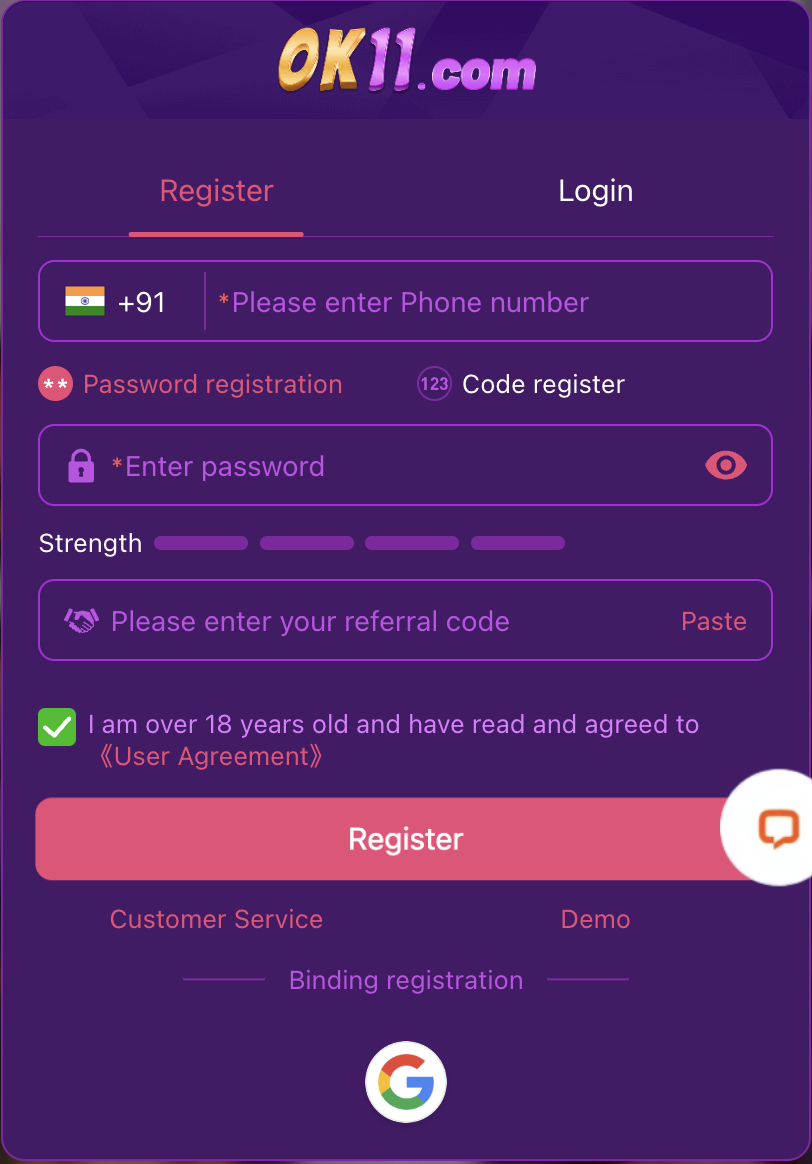
A straightforward start with your phone number
Use the registration form on the platform. Keep your phone number and password available for future access.
- 01
Open Register
Enter OK11 and choose Register when signed out.
- 02
Enter your phone number and password
Check the country code and phone number, then set a strong password. Initial registration does not require an SMS verification code.
- 03
Review the form and agreement
Fill a referral code if applicable and follow any field message shown. Read the age requirement and User Agreement before agreeing and submitting.
- 04
Continue with your account
Follow the result shown by the platform. Use your new account to explore games and eligible activities.
Know what the registration fields are for
| Field | What to enter |
|---|---|
| Country code and phone number | Your correct phone number with the matching country code. |
| Password | A strong, unique password that you can keep secure. |
| Referral code | Enter a code if applicable; follow any requirement shown on the current form. |
| Age and User Agreement | Confirm that you meet the stated age requirement and read the agreement before accepting it. |
Your account is the start, not the end of the discovery
Explore the game lobby
Browse game categories, find familiar titles and discover a different style of experience.
See the welcome activities
Compare the qualifying first-deposit offer, app activity and check-in rewards without treating them as an automatic signup credit.
Choose mobile access
Use your browser or compare the Lite and Native app routes for your device.
If registration does not go through
| What you see | What to do next |
|---|---|
| Account already exists | Use Login or account recovery instead of registering the same number again. |
| Phone number or password error | Read the field message, check the country code and correct the requested detail. |
| Submission has no clear result | Check for a result or error before trying again; ask platform support if the issue continues. |
Do I need an SMS code to register?
No SMS verification code is required for the initial phone-number and password registration flow described here. Code login is a separate sign-in option.
Where do I enter an SMS code when logging in?
On the Login tab, choose Code login, enter your phone number, request the SMS code and follow the displayed prompts.
Are welcome rewards credited just for creating an account?
Each activity has its own participation and claim conditions. Open the relevant activity after registration to see what applies.
Keep access to your account
Use a password you do not reuse elsewhere and keep your recovery details current through the platform. Never send passwords, SMS codes or payment PINs in an article or support message.