
Log in to OK11 and pick up where you left offYour games, activities and account in reach
Use your registered phone number and choose Password Login or Code login. Once signed in, return to the game lobby, explore current activities or open Profile for account and transaction records.
- Password or SMS code login
- Use your existing account
- Recovery and support entries
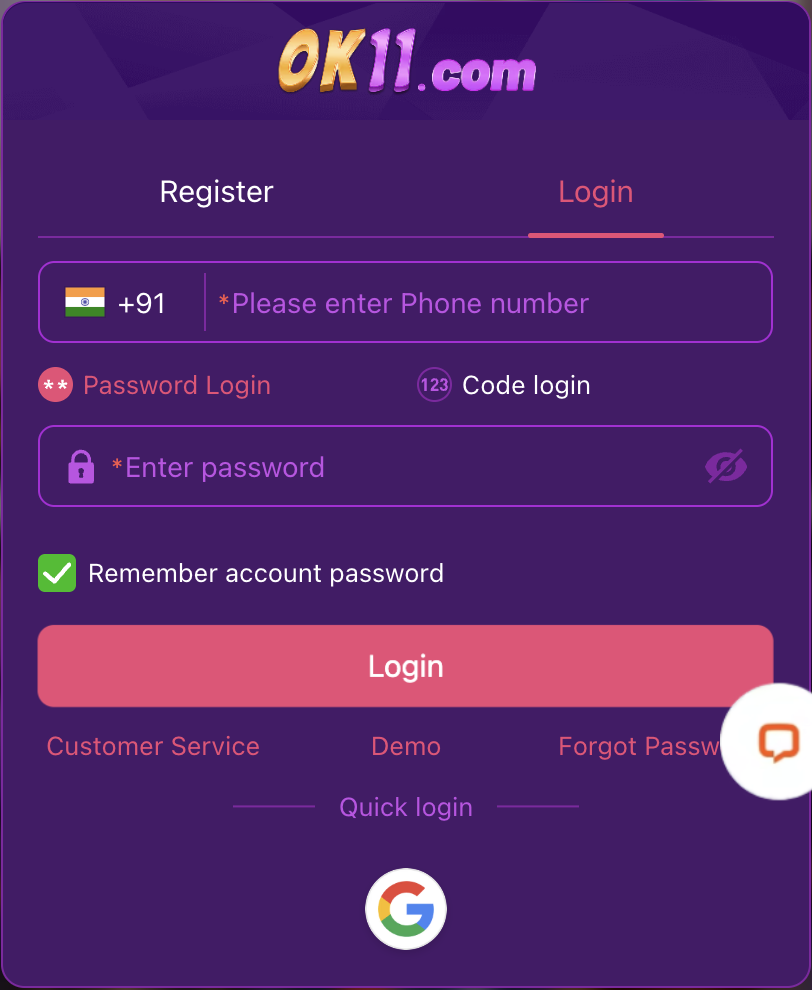
Choose how you want to sign in
Password Login
Enter your registered phone number with the correct country code, then enter the matching login password.
Code login
Enter your registered phone number, select Get Code and enter the received SMS code. Follow any timer or resend prompt displayed by the platform.
From the login form to the lobby
- 01
Open Login
Enter OK11 and choose Login if signed out. If your account is already shown in the lobby, you may already be logged in.
- 02
Select password or code login
Use the sign-in method that matches the information available to you. Check your country code and registered phone number.
- 03
Complete the selected method
Enter your password, or request and enter the SMS code. Review any error message before retrying.
- 04
Continue from your account
Open games, activities or Profile for account-related tasks.
Find the right answer to a login problem
Forgotten password
Use Forgot Password from the platform login form. If you cannot complete recovery, use its Customer Service entry.
SMS code not received
Check the country code and number, allow for delivery and follow the resend prompt. The Code login form provides a Customer Service entry for code-receipt problems.
Phone number or password rejected
Check the registered number, typing and extra spaces. Avoid repeated guesses and use recovery when the password is uncertain.
Page will not load
Check your connection and the current platform entry. Keep the browser or app error for support rather than reinstalling immediately.
Where would you like to go after login?
Back to games
Browse categories or search for a title you want to explore.
Check current rewards
Find the activity and participation details relevant to your account.
Account and payment records
Use Profile for account records, withdrawal management, Security Center and login-device information.
Keep login and payment credentials separate
- Do not save or remember your password on a shared device.
- The login password and withdrawal password serve different purposes.
- Never send passwords, SMS codes or payment PINs to support.
Do I need to register again if login fails?
No. Use the existing account, recovery or platform support first.
Does creating an account require the SMS code used for login?
No. Initial registration does not require an SMS code. Code login is a separate option for signing in.
Can this guide reset my account password?
No. Password recovery and account changes take place through the platform.