
Familiar payment options, clearer deposit and withdrawal stepsFrom selecting an amount to following your request
Use the PhonePe, Paytm, UPI Apps or QR payment entry provided by OK11 for deposits. For withdrawals, review your receiving details, amount and withdrawal password, then follow the request through platform records.
₹100–₹50,000
INR deposit range per transaction
₹110–₹20,000
INR withdrawal range per transaction
5–30 min
Normal arrival after order processing
Withdrawals normally arrive 5–30 minutes after the order has been processed. Bank, payment-channel conditions and checks can affect actual arrival.
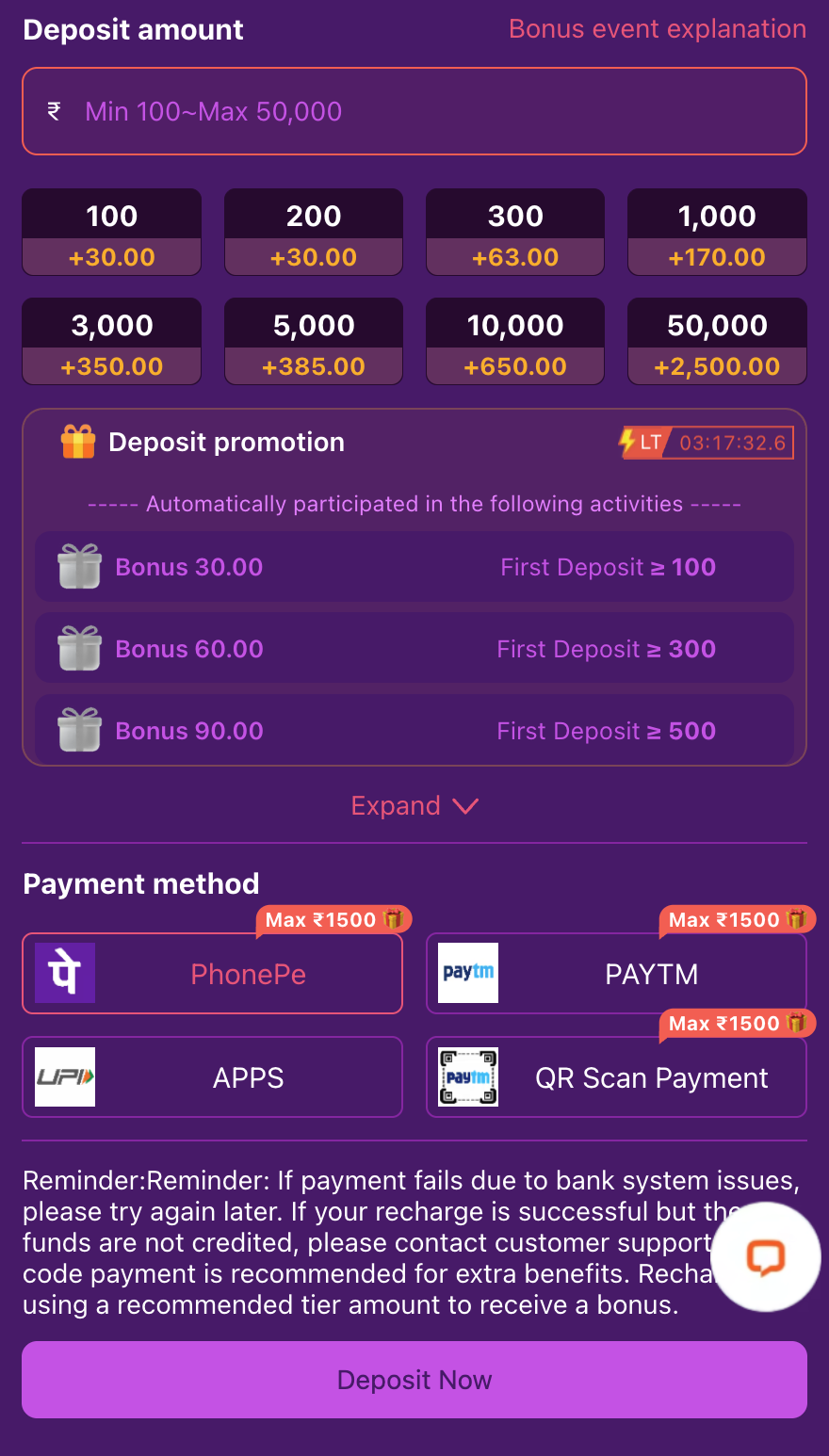
Choose a payment entry that suits your order
Select a method offered on the current deposit screen, then follow the payment details for that specific order.
PhonePe
Select the PhonePe entry and follow the instructions for the current order.
Paytm
Use the Paytm entry provided by the platform, checking the amount and payee details.
UPI Apps
The APPS entry displays UPI branding. Follow the route offered for your device and payment app.
QR Scan Payment
Use the QR instructions for the current order. Do not reuse an old code or payee record.
How to make a deposit
- 01
Open Deposit
Choose Deposit from the platform home screen.
- 02
Choose your amount and method
The INR deposit range is ₹100–₹50,000 per transaction. Select an available payment entry and check the range shown for your order.
- 03
Review the current order details
Check the amount, receiving details and any displayed charge or activity before paying. Use the QR code or payee details issued for this order, not a saved earlier request.
- 04
Return and check the record
Complete the selected payment route, return to OK11 and check the balance and order record. Keep your receipt if the credit is not shown.
Offer tiers are not general deposit limits. A payment-screen total can include separate activities, not just the first-deposit reward.
How to withdraw
Open Profile and choose Withdraw. If prompted, complete the withdrawal-password setup through the platform, then review the receiving account and request details.
- 01
Open Profile → Withdraw
Use the account area to enter the withdrawal screen.
- 02
Check receiving details
Review the available receiving method and account information, then enter the amount and required withdrawal password.
- 03
Review before confirming
Check the ₹110–₹20,000 per-transaction range, any shown fee and applicable activity requirements.
- 04
Follow the order
Arrival is normally 5–30 minutes after processing. Bank, payment-channel conditions and checks can affect the final time.
| Item | Guidance |
|---|---|
| INR amount | ₹110–₹20,000 per transaction. |
| Fees | Depend on the withdrawal amount and applicable activity terms; review the actual request. |
| Normal arrival | 5–30 minutes after the order has been processed. |
When a payment needs checking
Debited but not credited
Keep the platform order, payment reference, amount and time. Ask support to match the payment rather than paying again.
Withdrawal still processing
Check the record and provide the request details when asking support for an update.
Shown as processed, not received
Compare the receiving-account record and the platform request; ask support to trace the mismatch.
Payment failed
Read the failure message. The platform warns that bank-system issues can affect payment; check the previous order before trying another.
Fees and arrival times
Review any displayed charge before confirming an order. Withdrawal fees depend on the amount and applicable activity terms; deposit charges should be checked on the current payment request rather than assumed to be zero.
The normal 5–30 minute arrival estimate starts after order processing, not simply when you submit the withdrawal. Check the actual record if a payment or receiving-account issue occurs.
Understand the status before taking the next step
| Situation | What to do next |
|---|---|
| Payment deducted, platform balance not credited | Keep the receipt and payment reference; ask support to match them to the platform order. |
| Withdrawal still processing | Open the request record and check its current status before following up. |
| Processed, but not received | Compare the receiving-account record with the withdrawal request and give support the request reference. |
| Payment or withdrawal failed | Read the failure reason and check the funds status before starting another request. |
Keep these details for support
- Platform order or request reference
- Amount, date and approximate time
- Payment reference or receipt if available
- Current platform status and receiving-account record
- A screenshot with unrelated private details hidden
Never send your password, verification code, payment PIN or full card credentials.
Payment questions
Does the deposit screen show first-deposit rewards only?
No. Its displayed extra amount can combine different activities. Read each offer separately.
Is withdrawal to deposit a bank withdrawal?
No. A transfer back to the platform balance is different from a cash withdrawal.
Can I assume the same limit for all channels?
No. Check the current method and request screen.
Where do I ask about my own payment?
Use platform support with the order and payment details.